Art Bootcamp Notes · 14 · Drawing everything
How to Draw Action Poses: Turn a Verb into a Quick Doodle
Practise drawing people doing things: pick a verb like eat, get a rough sketch down fast, then fix, erase and salvage it into a clean doodle, stress-free.
 By LIPAI WANG · Chapter 14 of his book Art Is a Puzzle You Can Solve
Let’s draw an action: a normal, everyday action. This is really, really important, and it’s really good practice. To be honest, I’m really bad at drawing dynamic poses, so I set myself a challenge, and I combined it with something else I was doing at the time: learning a new language.
When you learn a language, there are verbs. A verb is someone doing something. So you just list out all the actions a human can do, and then you draw them, one by one. In this chapter we’ll take eat and go from a really rough sketch to a finished doodle, changing our minds along the way.
Start with the verb: eat
Imagine a person eating.
- Start with the eyes. When a person is eating, most likely the eyes are looking down. Seen from the front, it’s most likely going to be something like this. In Figure 13.1 the eyes are drawn as closed lines and the mouth is open.
- Add the neck, then the arms. Approximately, one hand goes this way and down, and then turns back this way. One arm goes down, the other arm goes up.
- Fix things as you go. My first arm was a little bit too low, so I used the lasso to select it, moved it up a little and rotated it.
- Add the shoulders and the clothes. I switched to the G-Pen here. The shoulder on one side came out overstretched, so I brought it in.
- Add the plate and the table. On the plate, put something simple: say, bread, or a hot potato.
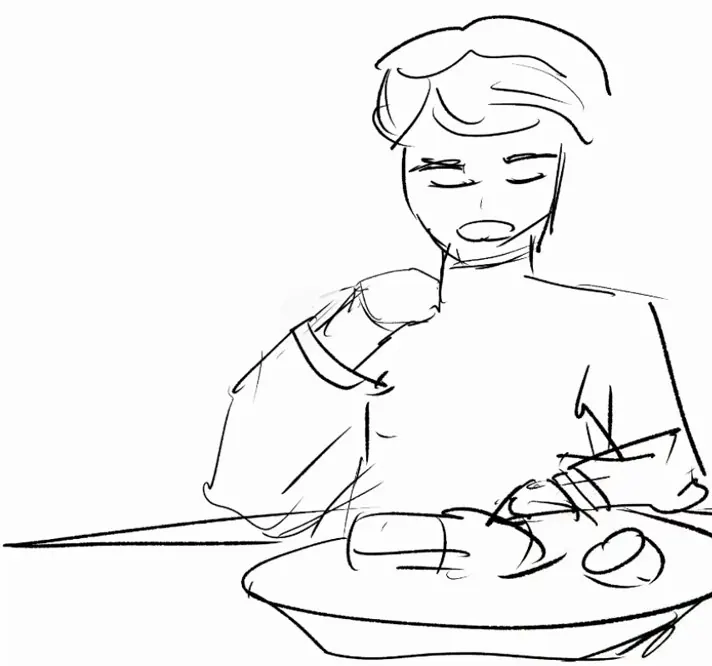
That’s a really rough sketch (Figure 13.1), but you can always modify it.
Try it. Imagine someone eating and draw the rough: eyes looking down, one arm going down, one arm coming up to the mouth, then the plate and the table. Don’t worry about how messy it is.
Modify the rough, stress-free
You’ve got the rough image out; now you modify it. Don’t worry too much while you’re drawing. First the rough, then the detail.
- The face. Add the ear. The brow may be a little bit too thin, so make it thicker. For the eye, go up a little at the ends and it becomes a little bit smiley. For the nose, push the line up a little so you get a hint of a nose.
- The hand. Mine definitely wasn’t good enough. I drew the fingers going down: one, two, three, four. Four, because the thumb overlaps, so go down a little below, curve a little, and just overlap.
- The arm. I stretched the arm, making it longer, and let the sleeve follow. Now the proportion on that side is better. The other side I thought was kind of good.
- The food and the hair. Add a tiny rounded detail to the bread, as if there’s something inside, and a tiny bit to the hair.
After the sketch comes the interesting part: adding more detail. But at this stage it’s just too messy. So say, “I want it to be more sketchy,” and use the eraser to get rid of the messy lines.
I call these finding lines: the lines you put down while the drawing is still forming in your mind. Now you want to get rid of some of them.
Change your mind: that’s the beauty of digital
I’d forgotten something: the spoon. So I used the lasso tool again, selected the hand, pressed Command+T and tilted it downwards a little. It looked a little bit weird. And obviously, if I rotate the hand, I have to rotate the whole arm. So I cancelled, pressed Command+D to deselect, selected the whole arm, moved it and stretched it out a little, then confirmed the change. That’s the beauty of digital drawing: you can still rotate things this late.
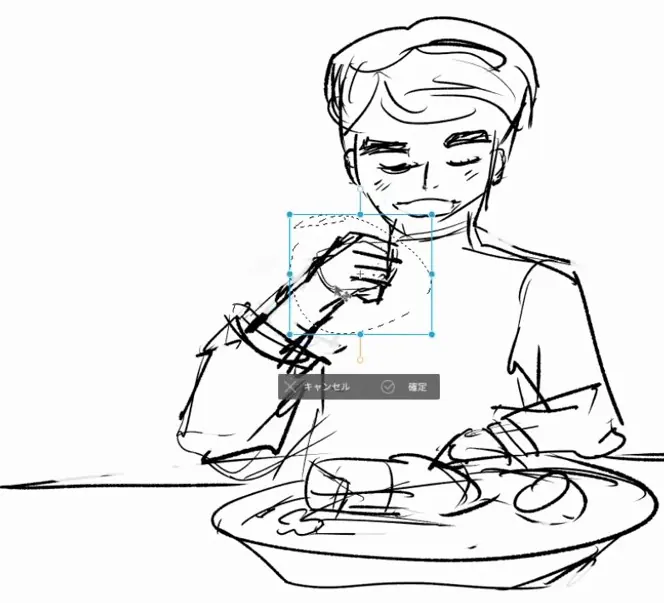
And then, maybe it’s not a spoon after all. You can change your idea while you’re drawing. I took the pen and put a chicken leg in his mouth instead. Later I changed my mind again. If I draw a chicken leg, there’s too much detail, and I want this to be a little bit symbolic. Changing the shape is even easier, so he’s eating pizza: just add some cheese, and some round shapes on it. Now I can safely get rid of all the finding lines around it, and the arm becomes clear.
Carve it out and salvage it
From here it’s adding, deleting, adding, deleting: carving out whatever you don’t want, erasing, modifying. It’s kind of stress-free.
- Shadow and folds. Inside the open mouth there should be some shadow. The rest is just a tiny bit of detail: a little folding on the clothes, a little folding on the sleeve.
- Intentional lines. Get rid of the unsure finding lines and put down more prominent, intentional lines.
- Push the proportions. I wanted to push the right shoulder down. Use your eraser as a tool of your own: erase, then redraw it lower.
- Salvage the gaps. The shoulder part was sort of missing. So add the shoulder back and salvage it by making some connection dots. Your mind will do the calculation and join them up.
- Clean up. Erase the messy lines in the hair so it’s not so messy. Make the lines you keep firmer.
I know it started really bad, but we salvaged it, and along the way we changed the style.
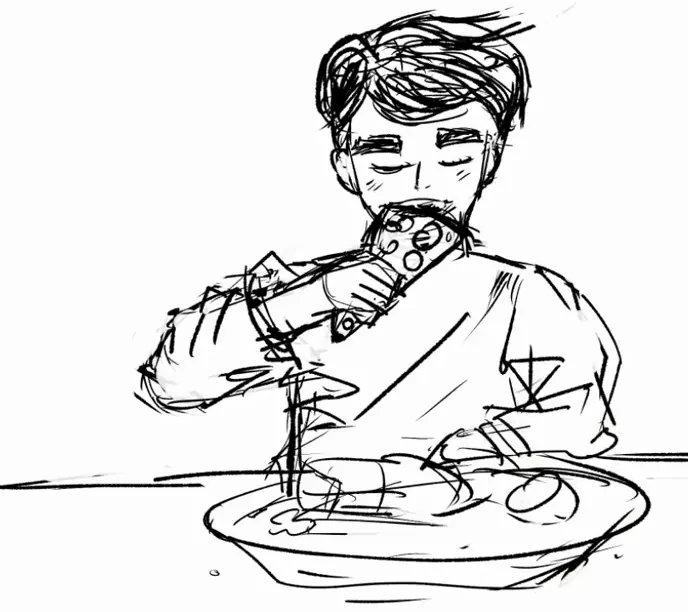
You can add colour now, or just keep it as it is (Figure 13.3).
Try it. Take your own eating sketch from rough to finished: erase the finding lines, firm up the lines you mean, and fix one proportion you’re not happy with. Then pick the next verb on your list and draw that.
Key takeaways
- Practise everyday actions by listing verbs, the actions a human can do, and drawing them one by one.
- Get the really rough image out first, then modify it. It should be a stress-free experience.
- Finding lines help the drawing form in your mind; once it has formed, erase them and put down intentional lines.
- You can change your idea while you’re drawing: rotate, stretch, or swap a spoon for a chicken leg for a pizza. That’s the beauty of digital drawing.
- Even a drawing that starts really bad can be salvaged by adding, deleting and carving it out.
LIPAI WANG
A self-taught artist and teacher, known to his video students as William Jiamin. A former programmer, he teaches drawing, painting, pixel art and 3D the way he learned them: one solvable piece at a time.